Monthly expense overview
Applies to 1.6 updatedThe monthly overview is the top part of the Expenses page — it shows how much the family has spent this month and how that spending breaks down across categories. Every family member with access to Expenses sees it; a child, however, only sees the expenses they logged themselves.
Where to find the overview
- Open Expenses in the main navigation.
- The overview sits right at the top — there’s nothing to switch or open.
- On the Dashboard, the Overview → link on the current month’s expenses card leads to the same place.
The overview always shows the current calendar month, and there’s no way to switch to a different one.
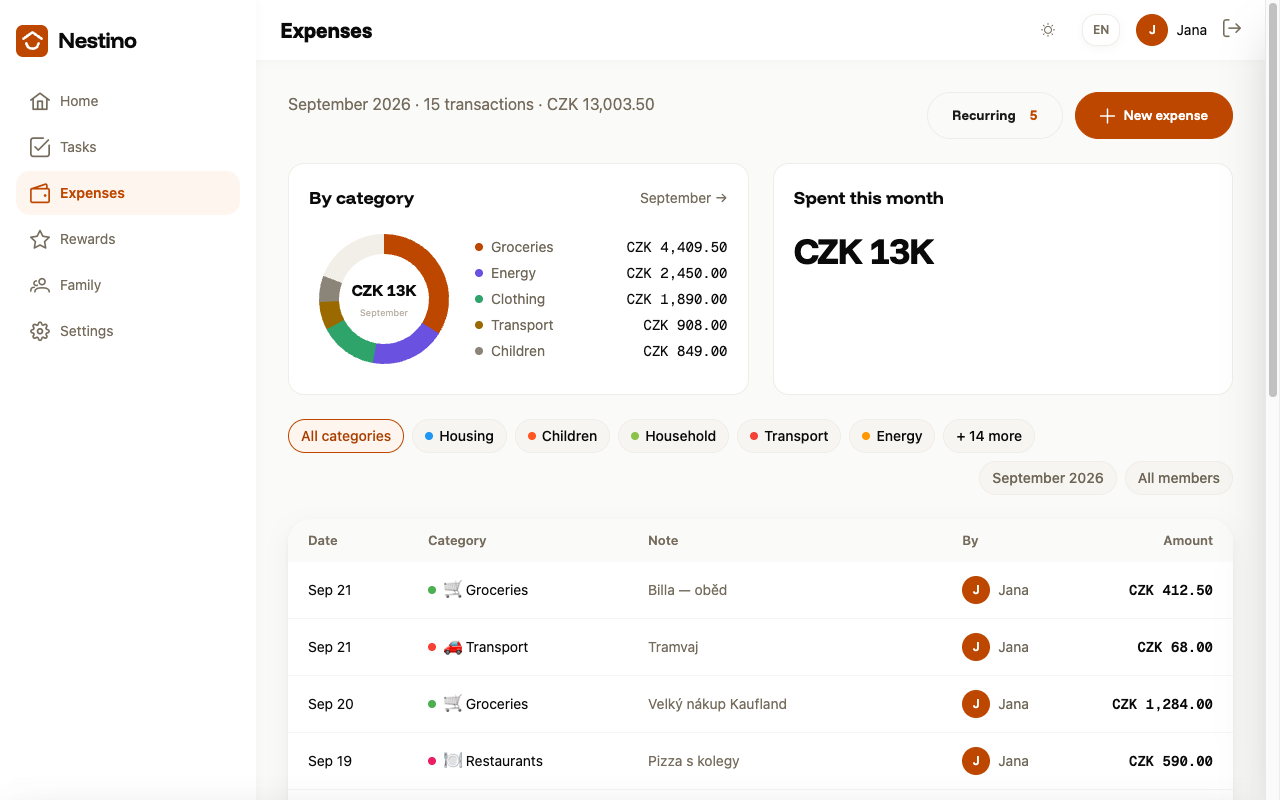
What you’ll see
| Element | What it shows |
|---|---|
| Page subtitle | The exact amount and number of transactions for the whole month, for example “September 2026 · 15 transactions · CZK 13,003.50”. |
| Spent this month tile | The same monthly total, rounded (for example “CZK 13K”). |
| By category chart and its legend | Only the five categories with the highest spending. |
| The table below the overview | All of the month’s expenses, sorted from newest. |
Filtering the table by category
Above the table is a row of category chips plus an All categories chip. Clicking a category shows only that category’s expenses in the table; clicking All categories clears the filter. You can only select one category at a time.
Transactions table
The table has Date, Category, Note, By and Amount columns; the By column hides on narrower screens. Clicking a row opens the expense’s detail.
When there are no expenses yet
If the family hasn’t logged anything for the month yet, the overview and table are replaced by a No expenses yet message with a New expense button that opens the form for logging the first expense.
When the overview fails to load
If the data can’t be downloaded, Nestino doesn’t pretend otherwise: it shows the message “Could not load your expenses. The figures below may be incomplete.” with a Try again button.
How to log an expense is covered in Logging an expense. The categories expenses are split between are managed in Expense categories.